Free product
Give VIP tier members a free product — let customers choose their gift, and set the perk to run once or on a recurring schedule
This feature is available for: Advanced, Ultimate.
Overview
The Free Product tier privilege adds a free gift to qualifying orders for customers in a tier. Attach one product or several, let customers choose which gift they want, and put the perk on a schedule — always on, a one-time welcome gift, or a recurring treat like "one free gift per year."
How to set up
Go to Membership → VIP Tiers → Tiers, open the tier you want, and click Add Reward. The Add perks form is a series of cards — fill them in top to bottom.
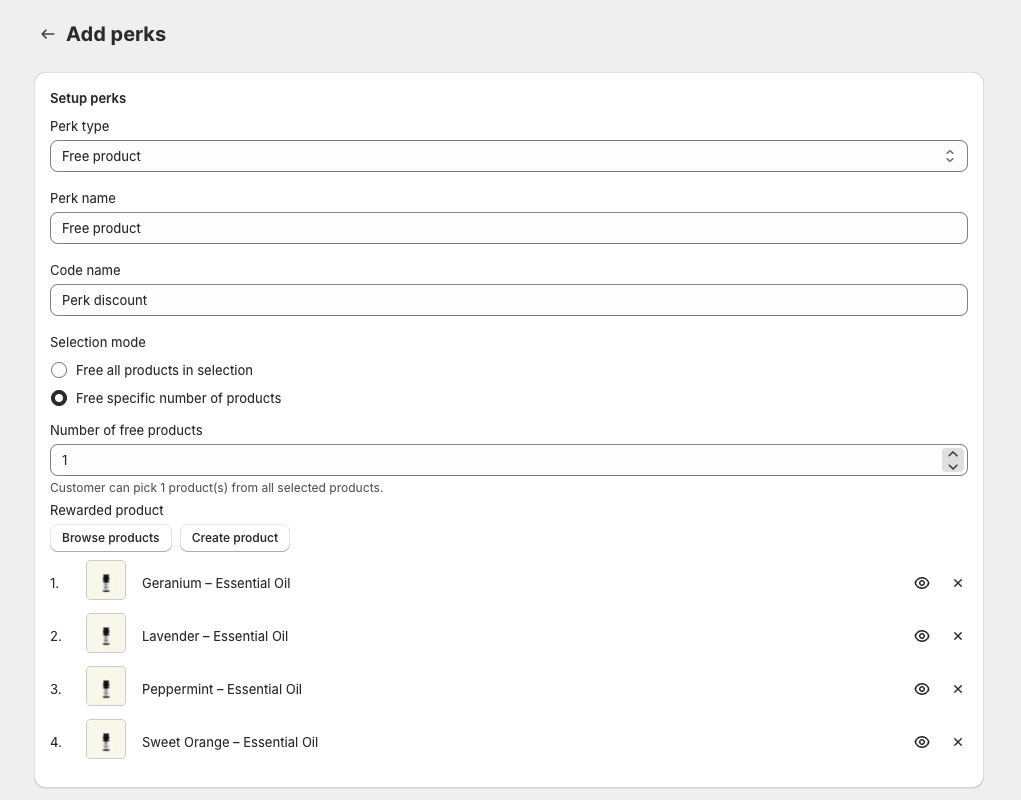
Setup perks
- Perk type — choose Free product.
- Perk name — the name customers see for this perk on your storefront (e.g.
Free gift). - Code name — an internal reference for the underlying automatic discount. Not shown to customers.
- Selection mode — decide whether customers get everything or pick their gift:
- Free all products in selection — every product you add is given automatically.
- Free specific number of products — the customer picks from your list. Set Number of free products; a hint confirms "Customer can pick 1 product(s) from all selected products."
When you let customers choose, the perk expands on the loyalty widget's Perks list to show your products. The customer selects up to the number you allowed (a single choice uses radio buttons; multiple uses checkboxes with a Selected: 2/2 counter), taps Claim Gift, and the reward then applies only to the product(s) they chose.
Selection mode is also available on product-specific Discount Amount and Discount Percentage privileges (when Apply to is set to specific products) — customers pre-select which products the discount applies to.
- Rewarded product — click Browse products to add existing products as the gift, or Create product to make a new one.
Perk visibility
Control who sees the perk on your storefront.
- Visible to all tiers — everyone sees it, including lower tiers — a good way to motivate customers to level up.
- Hidden from lower tiers — only customers who have reached this tier see the perk.
Reward information
- Icon — the icon shown next to the perk on the storefront. Leave Default (follow theme) to match your widget theme, or pick a specific icon.
Minimum order requirement
Set when the free product qualifies.
- Minimum requirements
- No minimum requirements — the perk always applies.
- Minimum purchase amount — require an order subtotal at or above an amount.
- Minimum quantity of items — require a minimum number of items in the order.
- Maximum requirements — tick Maximum purchase amount to stop the perk applying on orders above a value you set.
Condition
- Combinations — choose which other Shopify discounts this perk can stack with: Order discounts, Product discounts, and Shipping discounts. All three are on by default.
- Advanced conditions — optionally Add customer conditions to limit the perk. Only customers who meet the conditions you set can see and apply this reward.
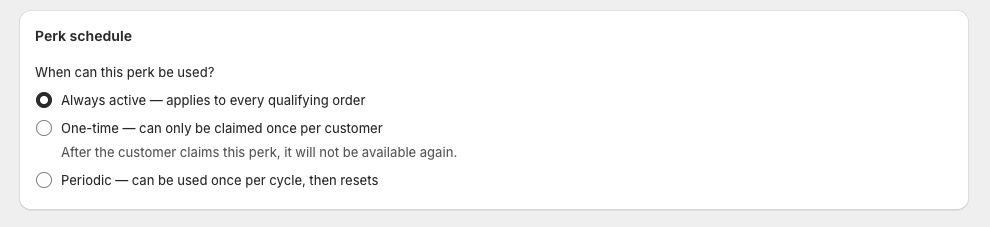
Perk schedule
Under When can this perk be used?, choose:
| Option | What it does (as shown in the app) |
|---|---|
| Always active | Applies to every qualifying order. |
| One-time | Can only be claimed once per customer. After the customer claims this perk, it will not be available again. |
| Periodic | Can be used once per cycle, then resets. |
When you choose Periodic, pick how the cycle resets:
- Fixed calendar date — every customer resets on the same date each year. Pick a month and day (e.g. January 1).
- Since last claim — each customer's cycle starts from the date they last used the perk. Pick a cycle length: day, week, month, or year.
On the storefront, a periodic perk shows its current state — Available now, Claimed · Available again on Jan 1, 2027, or Available on Jan 1, 2027.
Perk schedule works on every privilege type except Exclusive Products/Collections — not just Free product. You'll find the same Perk schedule card when editing any privilege.
Save
Click Save. The perk is now live for customers in this tier.
FAQ
Can customers pick which free gift they get?
Yes. Set Selection mode to Free specific number of products and choose how many. Customers select their preferred gift(s) from your list on the storefront before the reward applies.
Can a perk repeat on a schedule instead of every order?
Yes. Set Perk schedule to Periodic. Choose Fixed calendar date to reset everyone on the same day each year, or Since last claim to reset a rolling day/week/month/year after each customer's last use. Want a perk that's claimed only once, ever? Choose One-time instead.
Who can see the free product perk?
That depends on Perk visibility: Visible to all tiers shows it to everyone (handy for motivating lower tiers to level up), while Hidden from lower tiers shows it only to customers who have reached this tier.