Free shipping program
Let's see how you can create a program where customers can redeem points for free shipping, removing delivery costs as a barrier to purchase.
This feature is available for Essential, Advanced and Ultimate plans
💡 You can also schedule this program with start/end dates and restrict who can redeem it by customer segment — see Schedule programs and control who can redeem.
What is "Free shipping program" feature?
Free shipping program lets customers redeem their points for free shipping on their orders. When customers use their points, they receive a unique coupon code that removes shipping costs from their purchase. For example, customers might spend 100 points to get free shipping on their next order.
Why do you need this feature?
Free shipping is one of the most powerful incentives in e-commerce. By letting customers use points for free shipping, you can reduce cart abandonment, encourage larger purchases, and provide a compelling reason for customers to return to your store. This feature is particularly effective for stores that deal with significant shipping costs or compete with marketplaces offering free shipping.
How to set up this feature
Get access to "Free shipping program"
Choose Reward programs -> Redeeming programs -> Go to Free shipping program and select Add more
Set up "Free shipping program"
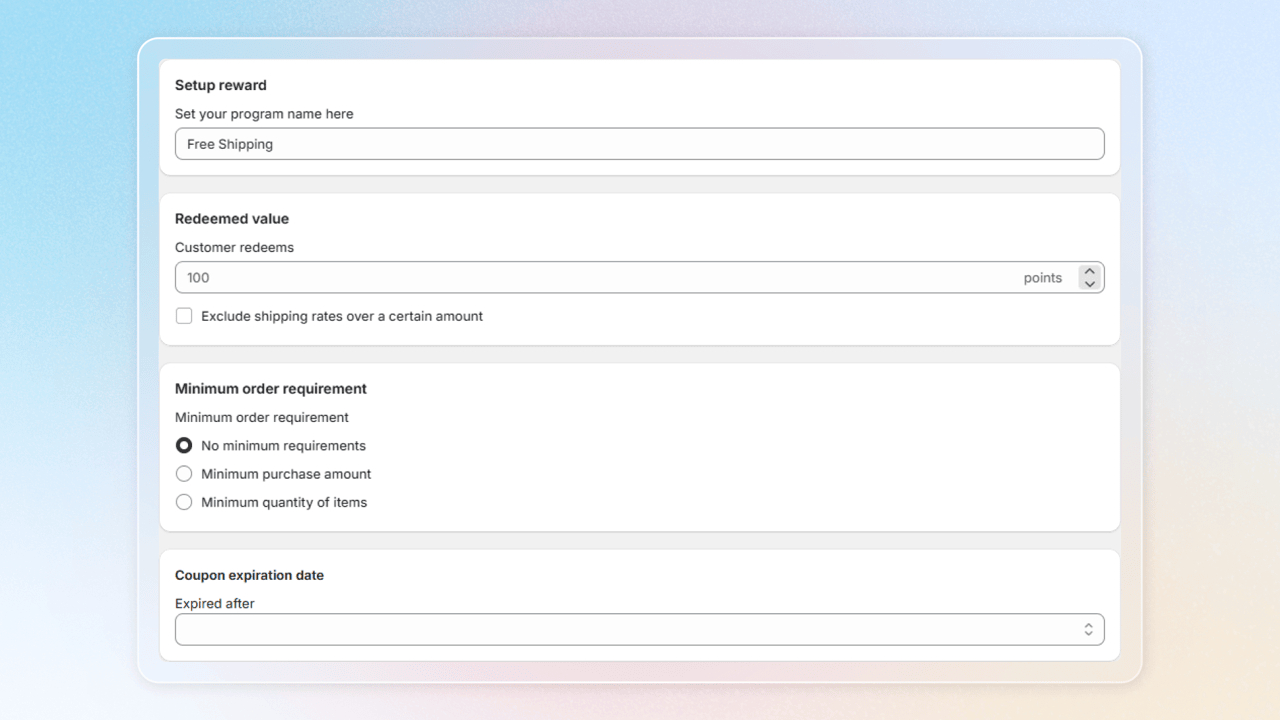
- Setup rewards: Enter a program name (e.g., "Free Shipping Rewards")
- Redeemed value: Set points requirement (e.g., 100 points for free shipping)
- Minimum order requirement:
- Condition:
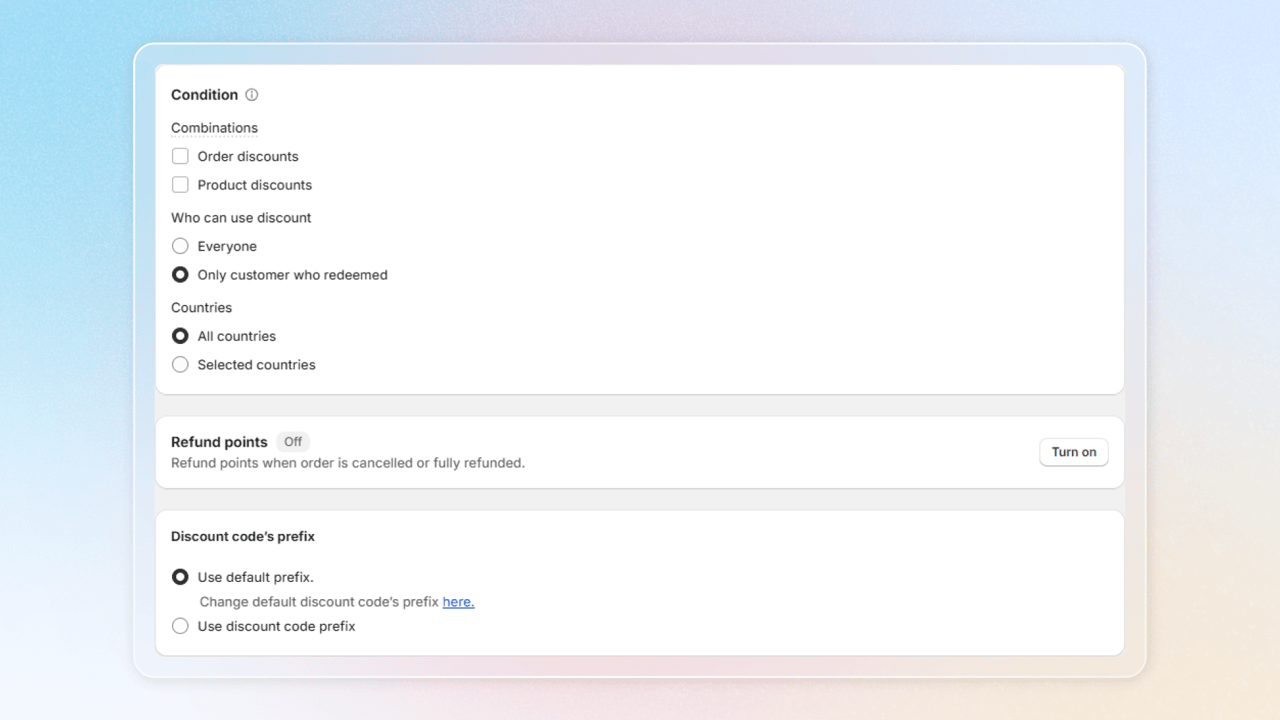
- Discount combinations: Choose if free shipping can be combined with Order discounts or Product discounts
- Sales channels: Pick where customers can redeem
- Usage restrictions: Choose whether everyone or only customer who redeemed can get your discount
- Advanced conditions: Limit the reward by customer details, such as Location. See Limit free shipping to certain countries
- Coupon expiration date: Set coupon expiration date
- Refund points: Configure refund points option for cancelled orders
- Discount code's prefix: Choose discount code prefix
Limit free shipping to certain countries
A Location condition limits a free shipping reward to orders that ship to the countries you pick. At checkout, Joy reads the order's shipping address, so a code redeemed by a customer in one country doesn't apply to an order shipping to another.
Location conditions are available on the Advanced plan and above.
Open Advanced conditions
In the program, find the Condition card and open Advanced conditions.
Add a Location condition
Add a condition under Customer → Location. Choose Is equal to or Includes, then select the countries where the reward applies.
Save
Click Save. The program summary shows which orders the code works on: "The code only works on orders shipping to …".
Customers see Only applies to orders shipping to … on the reward, so they know before they add to cart.
Behavior change for rewards with several conditions. The editor says All conditions are met, but a customer who matched any one condition used to qualify. Now every condition must match. Your settings aren't changed, but we recommend re-checking any reward or perk that has more than one condition.
Frequently asked questions
Why is my Location condition not applied?
Check your plan first. Location conditions need the Advanced plan or above. On a lower plan Joy keeps the condition but doesn't apply it, and the editor shows a warning.
Does a Location condition limit other reward types at checkout?
No. Only free shipping codes are limited at checkout. On Discount, Buy X Get Y and Free Gift programs the condition filters which rewards a customer sees, based on the country saved on their profile, and the code still works in any country.
Which country does Joy check?
For a free shipping code, Joy checks the shipping address of the order at checkout. The reward list is filtered by the country on the customer's profile, which can be different. A customer with no country on their profile still sees the reward, and checkout makes the final check.
What changed for rewards with more than one condition?
A customer now has to meet every condition. Before, matching one was enough. For example, a reward that requires a US address and a VIP tag now requires both. This applies to redeem rewards and perks.
Why can't I save two Location conditions?
If two Location conditions share no country, for example one for the US only and one for Canada only, no order can meet both. Joy blocks the save. Change the countries so at least one is in both.
Can I exclude a country?
Not with a Location condition. Excludes and Not equal to aren't offered, so list the countries where the reward applies instead. A condition that already uses them stays visible but is disabled.
What happens when a customer who doesn't qualify tries to redeem?
Joy refuses the redemption before it deducts any points.
Can customers exchange their coupons back for points?
Yes, you can convert customers' unused coupons back into points upon their request. This is merchant-only control — customers must contact merchants for refunds. You can revoke a coupon in the customer profile.
Need help?
Contact us via the live chat widget in your Joy admin, or email us at [email protected].