Set up a milestone
Create a milestone reward in a few minutes — pick a goal type, set the target, choose the reward, and activate.
This feature is available for Advanced and Ultimate plans.
Milestone types
The Milestone feature offers seven distinct types, each designed to encourage a different customer behavior:
- Number of orders milestone: Eg, extra 500 points for 3rd orders
- Amount spent milestone: Eg, extra 500 points after spending over $500
- Earned points milestone: Eg, extra 500 points after earning 1000 points
- Number of reviews: Eg, extra 100 points for posting 3rd reviews
- Inactivity milestone: Eg, 100 points for inactive customers for 3 months to incentivize them to come back
- Subscription milestones: Reward subscribers for reaching specific billing cycle milestones. Learn more →
- Mixed milestone (NEW): Combine multiple action types into a single sequential journey — orders, reviews, referrals, and more. Learn more →
How to set up
Get access to "Milestone"
Choose Reward programs → Go to Milestones
If you don't have any milestone rewards yet, click Add rule to start the setup
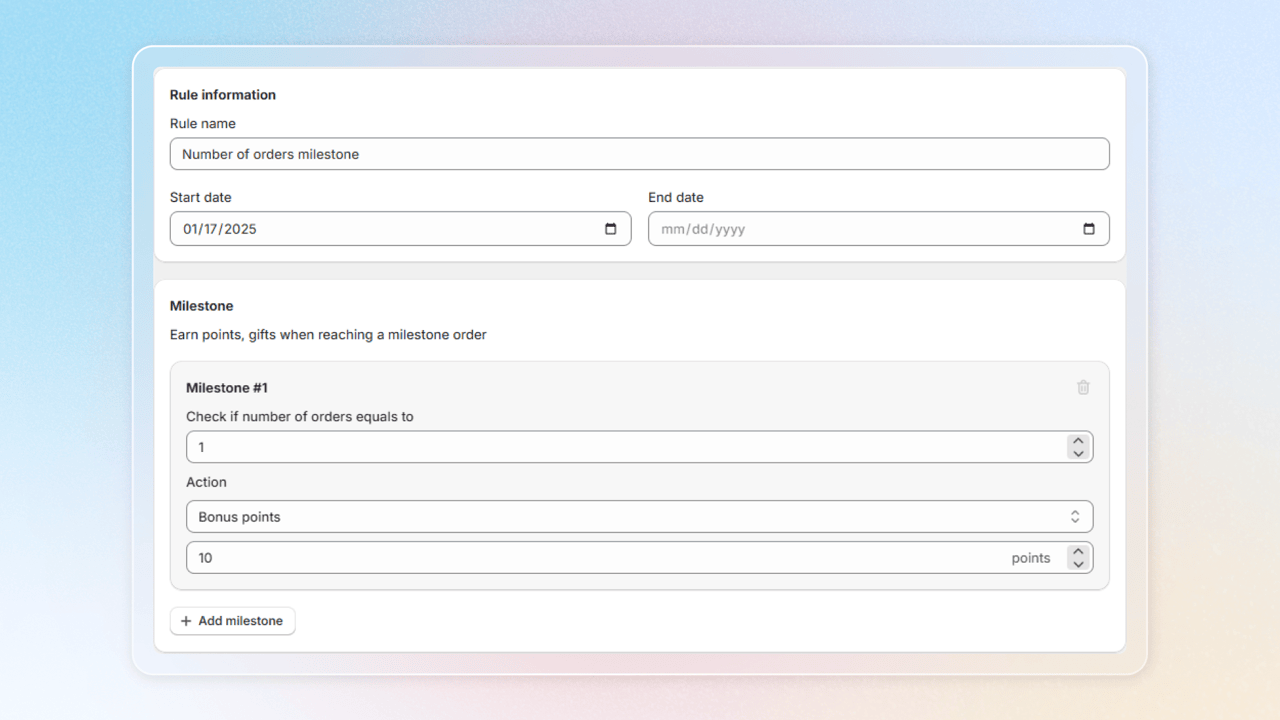
Set up your milestone
- Rule information: Edit the name and duration of the milestone program
- Milestone: Set the threshold required to achieve the milestone (e.g. number of orders, amount spent, or points earned, depending on the milestone type) and choose the reward customers will receive upon reaching it
Reward options
There are several reward options for customers:
| Reward type | Description | Example |
|---|---|---|
| Points | Set the number of points customers will earn | 500 points |
| Store Credit | Award store credit (cash value) to customer's account | $10 credit |
| Discount Amount | Offer a fixed dollar amount discount | $10 off next order |
| Discount Percentage | Provide a percentage-based discount | 15% off |
| Free Shipping | Give customers free shipping on their next order | Free shipping |
| Free Gift | Give customers free products, use Browse product to select | Free t-shirt |
If you need additional reward options, contact us via Livechat support to send a feature request.
Activate "Milestone"
Hit Save to apply all your changes and press Turn on to activate your milestone program
When customers pick their own reward
A milestone step either grants its rewards automatically, or lets the customer choose one. When the step is set to let the customer pick, the reward waits in their account until they claim it — and Joy makes that wait visible in three places.
- A badge in the widget. The Unified Widget shows a count of unclaimed milestone rewards on the Milestones row, and again on each program's header inside it. It is hidden at zero and for logged-out shoppers.
- A direct link.
#joy-milestoneopens the widget straight to the Milestones screen and survives a login round-trip, so the customer lands where they were headed even if they have to sign in first. The Milestone achieved email's button points there. See Deeplink. - A trigger for your marketing tools. Milestone reward ready to claim fires the moment the reward becomes claimable — available in both Shopify Flow and Klaviyo, where it is named Joy: Milestone Reward Ready To Claim. Use it to chase a reward the customer has left sitting.
The trigger fires once per customer per milestone, at the moment they reach it. Milestones that grant their reward automatically keep using Milestone achieved instead, and inactivity milestones do not fire it at all. Relaunching a program does not re-announce rewards that are already waiting.
New to milestones? See why milestones work → — the psychology and business case behind them.
Confirm the claim with an email
When a customer claims a reward from a step that lets them pick, Joy can email them straight away. The Milestone reward claimed email lists what they received: the discount code with its expiry date, the points added with their new balance, store credit, and the free gift variant they chose.
The email is off by default. To turn it on, open Settings > Notifications and switch on Milestone reward claimed, which sits right below Reach new milestone. You edit its content in the same email editor as your other notifications.
The claim also fires an event for your marketing tools, on top of the email:
- Klaviyo: Joy: Milestone Reward Claimed. Tick it in the Klaviyo integration to start sending it. See Joy & Klaviyo.
- Shopify Flow: Milestone reward claimed. Create a flow from this trigger. See Shopify Flow reference.
The event fires whether or not the email is on, as long as the integration is connected.
Joy sends one email and one event per claim, and only for steps that let the customer pick. Steps that grant their reward automatically keep using Reach new milestone, and choosing a gift variant on one of those steps sends nothing. The email only describes what was actually granted.
Frequently asked questions
Why didn't my customer get the claim email?
First check that Milestone reward claimed is switched on in Settings > Notifications, because it is off by default. It is also not sent for steps that grant their reward automatically, to customers who unsubscribed from Joy emails, or to customers with no email address.
What happens if a customer clicks Claim twice?
Joy grants the reward once. The second attempt returns "This reward has already been claimed", and only one email and one event are sent.
The email shows fewer points than the reward I set. Why?
The email reports the points actually added. If an earning limit on your store trims the reward, the email shows the trimmed amount.
I changed a reward after the customer reached the step. Which one do they get?
The reward as it is configured when they claim.
Can I send the claim event to Omnisend or Attentive?
Not yet. The event goes to Klaviyo and Shopify Flow only.
Need help?
Contact us via the live chat widget in your Joy admin, or email us at [email protected].