Apple Wallet Loyalty Pass
Let customers add their loyalty QR code to Apple Wallet for faster POS checkout.
This feature is available for Advanced plan.
Overview
Apple Wallet integration allows customers to save their loyalty QR code directly to their iPhone's Wallet app. At POS checkout, customers simply show their Apple Wallet pass, and staff can scan the QR code to instantly access their loyalty information and apply rewards.
Setting up Apple Wallet
1. Generate the pass
Go to Customers in Joy Loyalty
Select a customer
Click More actions → Generate pass wallet
Choose Apple Wallet
2. Customize the pass design
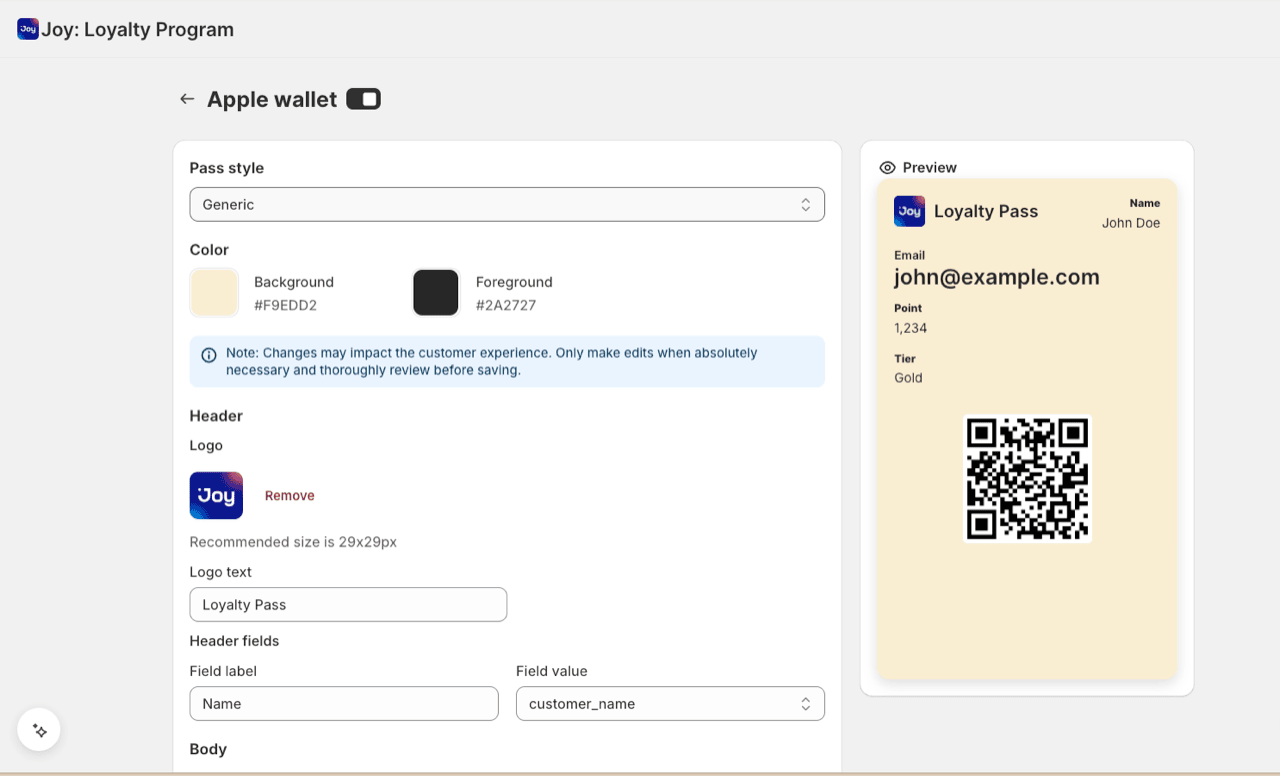
Configure how your loyalty pass looks and exactly what information it shows. Beyond colors and logo, you control which fields appear and what they say.
These settings apply to every customer's pass across your store — not to a single customer. When you save, existing passes re-generate automatically to match. Customer-specific fields (points, tier, name…) still show each customer's own values.
| Setting | What to customize |
|---|---|
| Logo | Upload your brand logo |
| Logo text | Optional text beside the logo — toggle on/off; leave off to hide it |
| Colors | Background color, text color |
| Pass name | The pass title/description (replaces the old fixed "Joy Loyalty") |
| Field groups | Toggle each group — Header, Primary, Secondary, Auxiliary — on or off |
| Field values | Pick a customer variable (points, tier, name…) or a fixed Custom value |
| Field labels | Optional — leave a label blank to show only the value |
Fine-tuning individual fields
- Toggle field groups: turn off any of Header / Primary / Secondary / Auxiliary and that whole group is left off the pass.
- Custom value: in a field's dropdown, choose Custom value to enter your own fixed text instead of a customer variable — handy for a tagline, hotline, or store note.
- Optional labels: leave a field's label empty to show just the value on one line. A label with an empty value still shows the label.
- Empty fields are skipped: if both label and value are empty, the field simply doesn't appear.
Logo and font sizes can't be changed. Apple (and Google) enforce the font size, image size, and placement on wallet passes — there's no setting for these. To make text stand out, place that field in the Primary group. For a larger visual, upload a horizontal logo or use a strip image.
3. Enable the feature
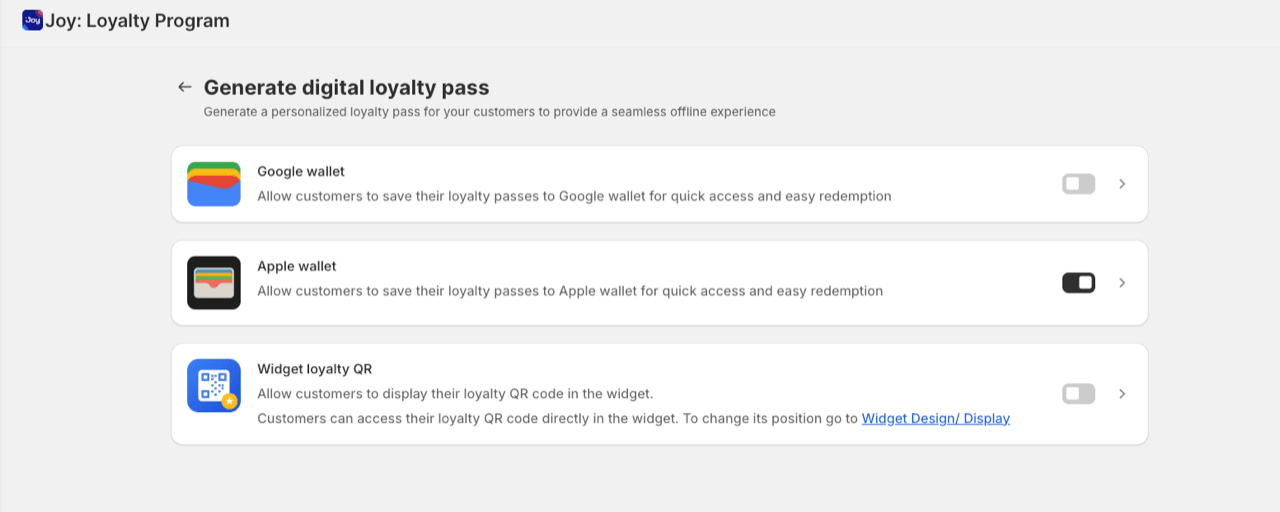
Toggle Apple Wallet to On
Click Save
The option will now appear for customers
4. Add the loyalty pass block (if needed)
If customers don't see the Apple Wallet option:
Go to Embedded Content → Account Page
Add Loyalty Pass block
Click Edit in Theme Editor
Position the block on your account page
Save changes
How customers add to Apple Wallet
Step 1: Access loyalty pass
- Log into their account on your store
- Navigate to the loyalty section
- Find the "Loyalty Pass" block
Step 2: Scan QR code
- Use iPhone camera to scan the displayed QR code
- Or tap "Add to Apple Wallet" button (if available)
Step 3: Add to Wallet
- iPhone opens the pass preview
- Tap "Add" in the top right
- Pass is now saved in Apple Wallet
Step 4: Use at checkout
- Open Apple Wallet on iPhone
- Select your store's loyalty pass
- Show QR code to staff for scanning at POS
Using at POS
For staff:
- Customer opens Apple Wallet and shows loyalty pass
- Scan the QR code with POS scanner
- Customer information loads automatically
- Points balance and available rewards display
- Apply rewards and complete transaction
FAQs
Do customers need the Joy Loyalty app? No, they only need access to your website and an iPhone with Apple Wallet.
Does it work with all iPhones? Works with iPhone 6 and later running iOS 12 or higher.
Can customers have both Apple and Google Wallet passes? Yes, if they have devices for both platforms.
Does the pass update automatically? Yes, points and tier information update in real-time.
What if a customer loses their phone? They can remove the pass from Apple Wallet remotely and regenerate a new one from their account.
Can I disable it for specific customers? Yes, you can manage pass generation per customer in the admin.