Deeplink
Learn how to integrate Deeplinks into your website's navigation, providing an alternative way for customers to access and trigger the Joy widget effortlessly.
This feature is available for All plans.
What is "Deeplink"?
Deeplink is a feature that simplifies access to the Joy widget directly from your store's website. By adding Deeplinks to your menu or footer, customers can quickly open the loyalty program interface, improving their interaction with your store.
Additionally, this Deeplink allows you to hide the floating button if not needed. The widget will be triggered by the link on the menu.
Why do you need Deeplinks?
Deeplinks make it easy for customers to access your Joy widget directly from your website’s menu or footer, ensuring seamless interaction with your loyalty program. They also let you hide the floating button, keeping your store’s design clean while maintaining quick access for customers.
How to set up
Deeplink is supported right out of the box, so there’s no need to manually set up the deeplink anchors. Every screen below is addressable two ways — as a URL hash, or as an ?open_joy= query parameter.
| Screen | Anchor | Query parameter | Notes |
|---|---|---|---|
| Home | #joy-home | ?open_joy=joy-home | |
| Loyalty | #joy-loyalty | ?open_joy=joy-loyalty | Customer must be logged in |
| Open the widget | #joy-open | ?open_joy=joy-open | Opens the widget without targeting a screen. ?open_joy=true and ?open_joy=1 do the same |
| Ways to earn | #joy-ways-to-earn | ?open_joy=joy-ways-to-earn | joy-earn also accepted |
| Ways to redeem | #joy-ways-to-redeem | ?open_joy=joy-ways-to-redeem | joy-redeem also accepted |
| Referral program | #joy-referral-program | ?open_joy=joy-referral-program | joy-referral also accepted |
| My History | #joy-activities | ?open_joy=joy-activities | |
| My Coupons | #joy-rewards | ?open_joy=joy-rewards | |
| Milestones | #joy-milestone | ?open_joy=joy-milestone | Unified Widget only |
| VIP Perks | #joy-perks | ?open_joy=joy-perks | Unified Widget only · customer must be logged in |
| Profile | #joy-profile | ?open_joy=joy-profile | Unified Widget only · customer must be logged in |
| Store credit | #joy-store-credit | ?open_joy=joy-store-credit | Unified Widget only · customer must be logged in |
Find your deeplink settings
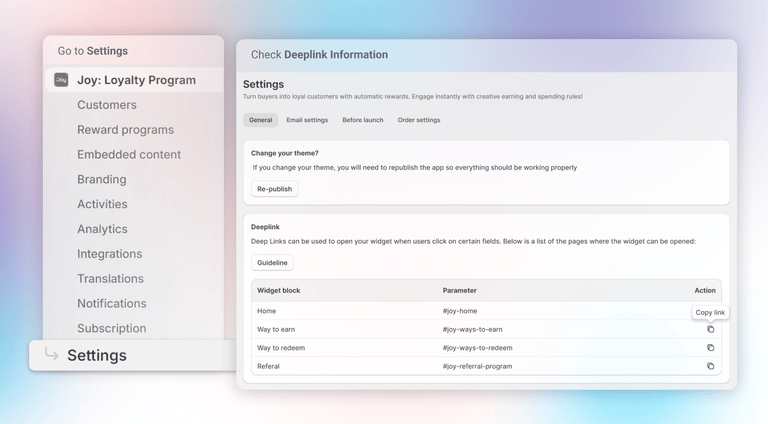
Go to Setting > General and you can see the deeplink information
Add the Deeplink to the Menu or Footer
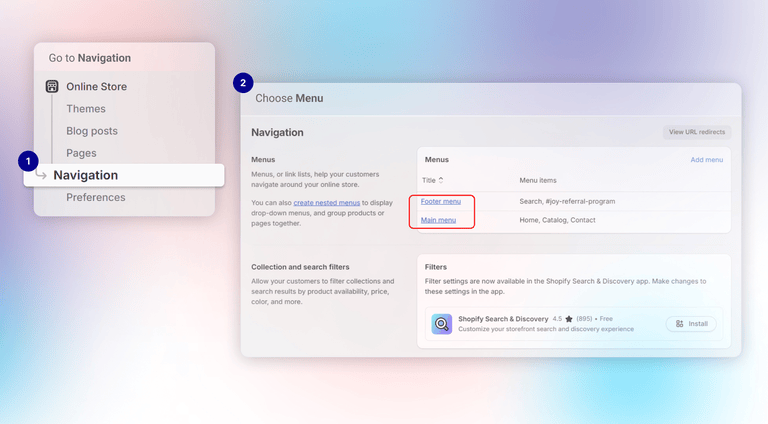
In the top bar navigation, select Online Store -> choose Navigation. Next, choose the Main Menu or Footer where you want to add the Deeplink
Fill the information for the menu item
Click on Add menu item, and fill in the name for the menu item. With the URL value, you can just paste the value copied straight from the Joy admin and then hit Enter.
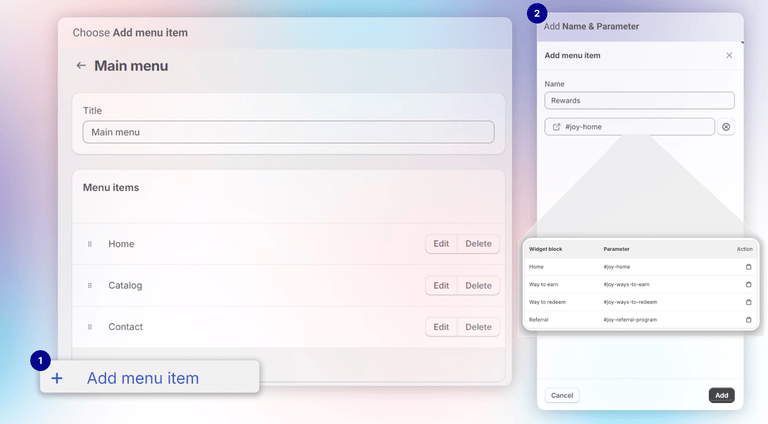
In the example below, I chose the Main menu and added a Rewards item to it. I then pasted the parameter #joy-home into the link field. After saving all the settings, clicking "Rewards" in the menu will automatically display the Joy widget's home page.
How to trigger widget using top menu only
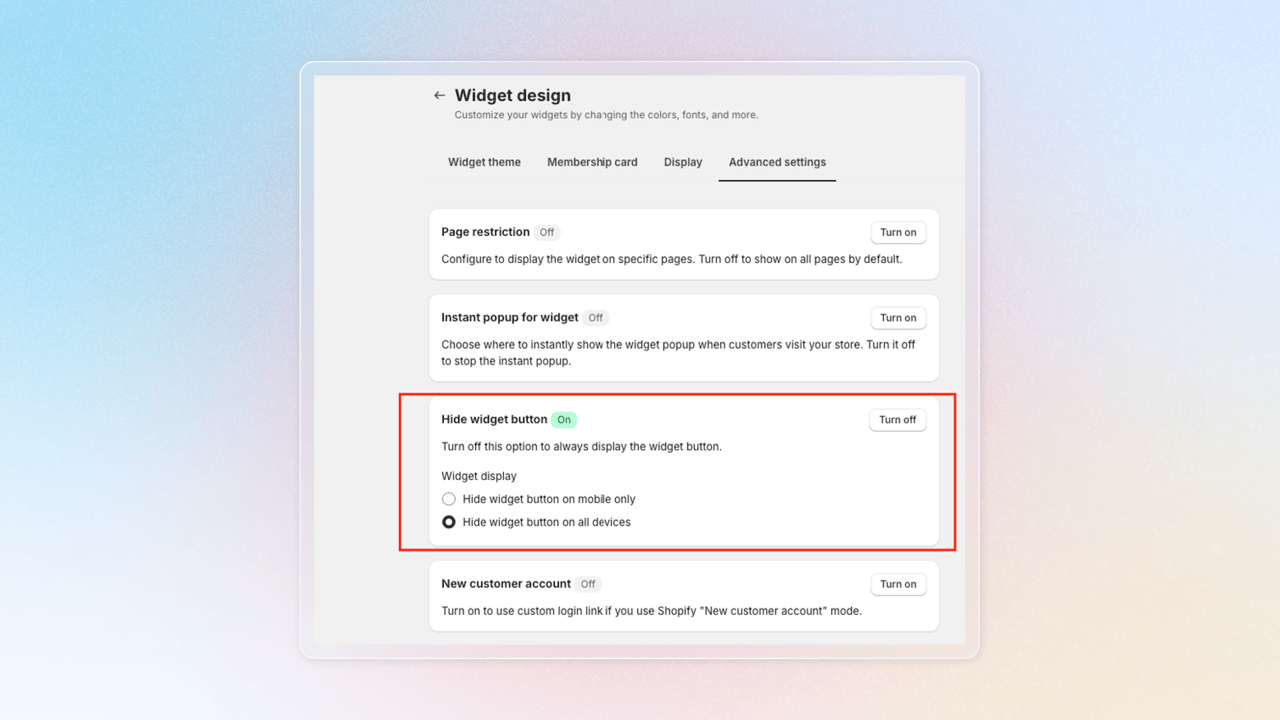
In Widget Design > Advanced Settings, simply toggle the Hide Widget option. This will hide the floating button, but the widget will still function and can be triggered via a deeplink or our JS SDK (opens in a new tab).
Open the widget with a query parameter
Some places strip a URL hash before the link ever reaches the customer — email builders, SMS shorteners, QR generators, and redirect chains are the usual culprits. For those, use the ?open_joy= query parameter instead. It takes the same value as the anchor, without the #:
https://your-store.com/pages/rewards?open_joy=joy-ways-to-redeemUse ?open_joy=true or ?open_joy=1 to open the widget without sending the customer to a particular screen.
Once the widget has opened, Joy removes the parameter from the address bar, so refreshing or sharing the page does not reopen the widget unexpectedly.
The anchor and the query parameter do the same thing. Use whichever survives the channel you are linking from — a hash is fine in a store menu, a query parameter is safer in email and SMS.
Wrap up
Integrating Deeplinks into your website’s menu or footer provides an alternative way for customers to access your loyalty program. By setting up Deeplinks, you give your customers an additional, convenient option to trigger the Joy widget whenever they need it.