Exclusive products for VIPs
Integrate Joy Loyalty with Avada Order Limits Quantity to create exclusive shopping experiences based on customer loyalty tiers
Introduction
This feature is built based on frequent requests from merchants who want to offer truly exclusive products to their most loyal customers. Many brands run VIP programs where certain items, bundles, or collections should only be accessible after customers reach a specific tier—not just discounted, but genuinely gated.
With Exclusive products for VIPs, Joy lets you restrict specific products or entire collections so only customers in selected VIP tiers can purchase them. For non-eligible customers, Joy blocks access and shows an unlock message instead, encouraging them to join or upgrade their membership.
Before you start
Make sure you already have at least one VIP tier created in Joy → Membership.
Joy manages exclusive product blocking using Shopify Functions (opens in a new tab), so the access rules run natively in Shopify’s checkout flow. This keeps the experience fast, stable, and fully compatible with modern Shopify setups—without relying on theme hacks or custom scripts.
We can try setting the product status to Unlisted (opens in a new tab) to make sure it is exclusive on the storefront.
Set up exclusive products/collections
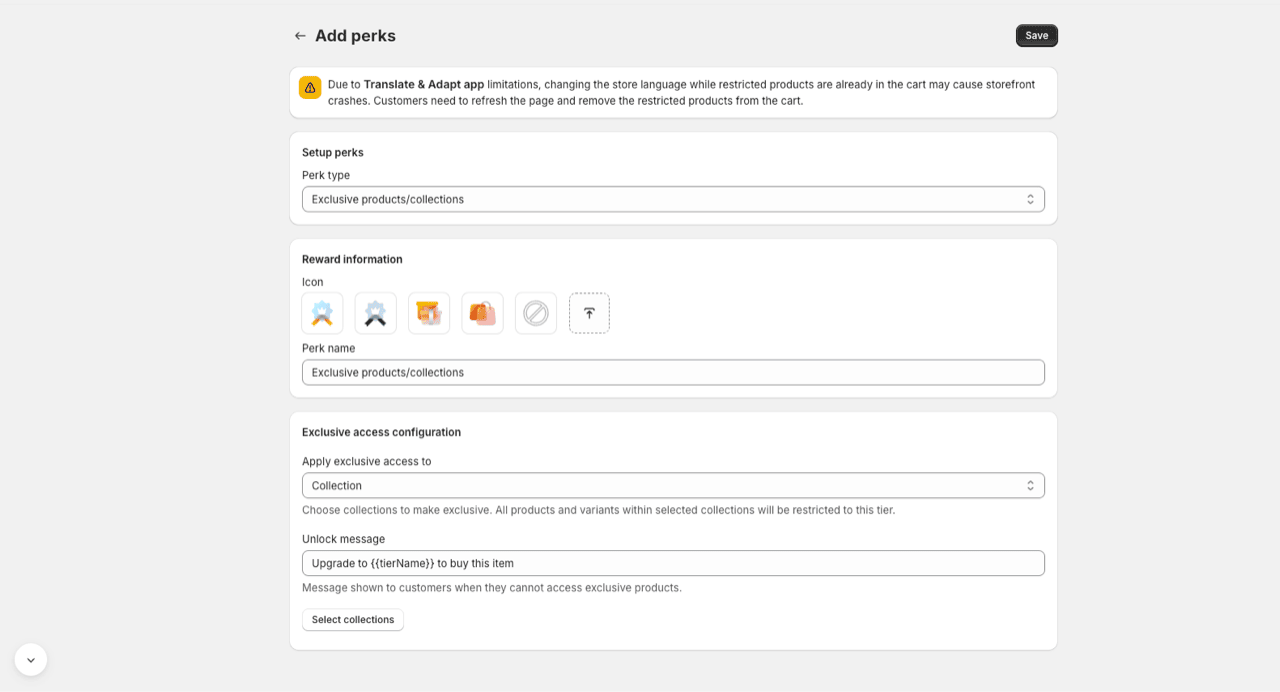
- Go to Joy → Membership.
- Open the VIP tier you want to apply the perk to.
- In Tier privileges / Perks, click Add perks.
- In Perk type, choose Exclusive products/collections.
- In Reward information:
- Choose an icon (optional).
- Enter a Perk name (this is shown to customers).
- In Exclusive access configuration:
- In Apply exclusive access to, choose Collection (recommended) or Product (if available in your plan/setup).
- Click Select collections (or select products), then pick what you want to restrict.
- In Unlock message, customize what non-eligible customers will see.
Tip: Keep{{tierName}}to automatically show the tier name (example: “Upgrade to Gold to buy this item”). - Click Save.
How it works on your storefront
- If a customer belongs to the VIP tier, they can add and purchase the exclusive items normally.
- If a customer doesn’t belong to the VIP tier, Joy will block access and show your unlock message.
- If you select a collection, all products and variants inside that collection are restricted to the tier.
Notes and limitations
- If you use Shopify’s Translate & Adapt app: switching the store language while restricted products are already in the cart may cause storefront issues. Customers should refresh the page and remove restricted items from the cart before continuing.
- Exclusive access works best when customers are encouraged to log in (so Joy can identify their tier).
Troubleshooting
If a VIP customer is still blocked:
- Confirm the customer is actually assigned to the correct VIP tier.
- Confirm the product is included in the selected collection(s).
- Refresh the storefront cache / try an incognito window to rule out cached cart/session data.